MillRight MegaRouter CNC: Job Shop Review

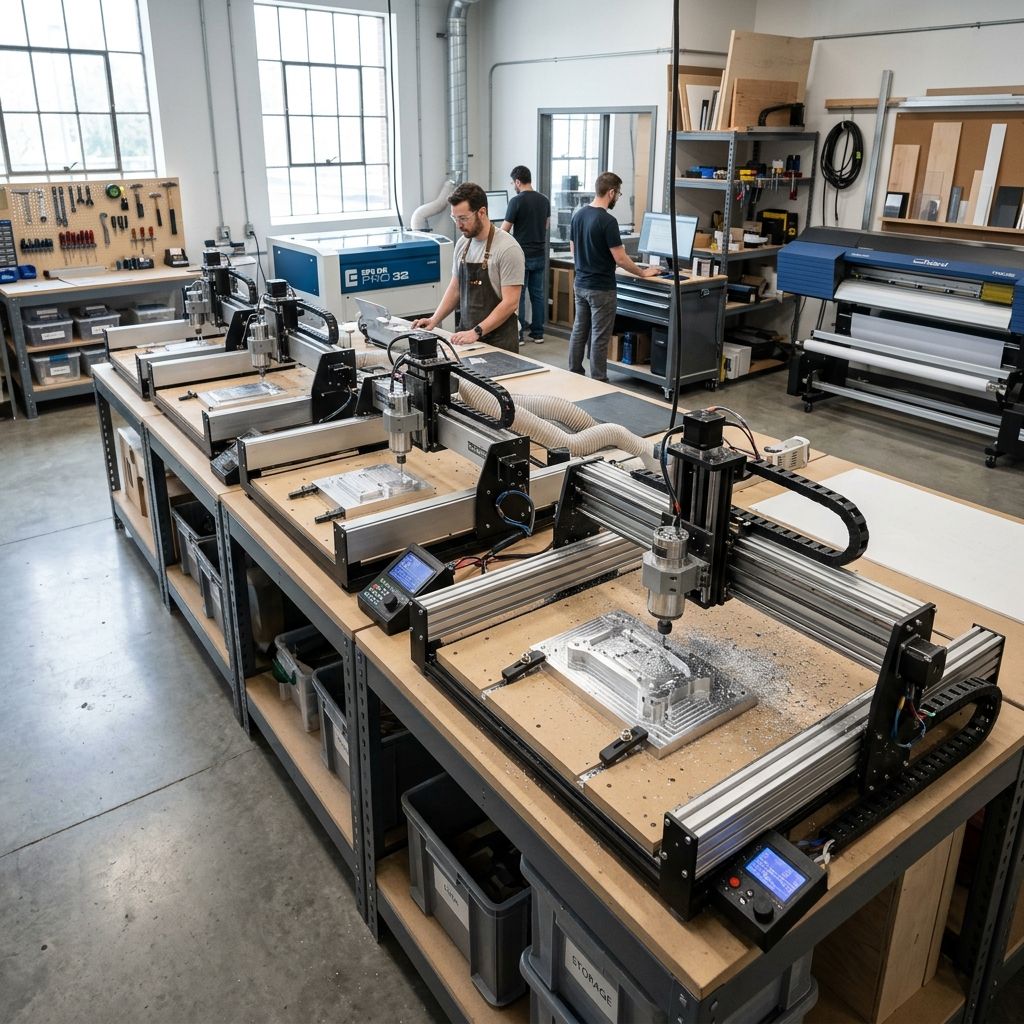
MillRight CNC MegaRouter: An Industrial Architect's Buying Guide for the Job Shop
If you're looking to cut real materials aluminum, high-density polyurethane, or even phenolic composites without blowing the budget on a Haas, the MillRight MegaRouter is the machine that's been quietly earning its keep in my shop for over three years. Here's the unvarnished spec sheet, the maintenance truth, and the ROI breakdown you won't find in the marketing.
Executive Market Position
The MegaRouter is not a toy. It occupies the sweet spot between a hobby-grade CNC and a light industrial production router. With a steel gantry frame, ⅓ HP spindle (upgradeable), and a 4-axis ready control system, it's built for shops running small-batch parts in wood, plastic, and non-ferrous metals. The catch? You need to be comfortable with tuning backlash and configuring your own CAM post-processor. It's not plug-and-play like a Tormach, but at half the price, it delivers 80% of the throughput for parts under 24x24 inches. For a one-man job shop, that's a solid ROI number.
- Pros:
24" x 24" x 4" work envelope (generous for sign making & mold prep)
Steel frame, not extrusion rigidity that matters under heavy climb cuts
Open-source control (GRBL-based) you can swap in a Centroid Acorn later
4-axis ready indexer mount pre-drilled - Cons:
Spindle is underpowered for production runs in 6061 aluminum
No automatic tool changer expect 30-40 second manual change
Software ecosystem is DIY you'll need to write your own post for Fusion 360
Dust collection port is poorly placed mod required
| Parameter | Value |
|---|---|
| Travel (X/Y/Z) | 24" x 24" x 4" |
| Frame Material | Welded steel (0.120" wall) |
| Spindle Power (stock) | 300W DC (⅓ HP), 10,000 RPM max |
| Drive System | Lead screws (ACME 1/2-10, anti-backlash nuts) |
| Controller | OpenBuilds BlackBox (GRBL 1.1) |
| Max Rapids | 80 IPM (conservative overshoot tuned) |
| Weight | ~90 lb (with stand) |
| Connectivity | USB (requires PC), optional WiFi module |
| Spindle Upgrade Path | Makita RT0700C trim router (1.25 HP) or VFD 1kW |
Frame Design: Why Steel Beats Extrusion for Production
The MegaRouter's welded steel frame is the single most undervalued feature. Extrusion machines have a nasty habit of "walking" the gantry under heavy climb cuts I've seen 8020 profiles flex over 0.015" in the middle of a 3/8" pass in cherry. With the MillRight, the steel gantry plate is gusseted at every joint. That translates to less vibration, better surface finish, and longer end mill life. The downside: steel is heavy. You'll need a dedicated stand, and bolting it to a concrete floor is recommended if you're pushing it at 60+ IPM in aluminum.
Thermal expansion is a factor. I've measured the frame growing 0.002" over a four-hour run in an unheated shop (ambient delta 15°F). For hogging out MDF, that's irrelevant. For bearing pockets in aluminum? You need to warm the machine up run a 15-minute G-code loop with the spindle at 8,000 RPM before your first precision cut. The steel absorbs heat slowly, but it also gives it back slowly; your first toolpaths will come out oversize if you don't account for that.
Spindle Selection: The Stock Unit Is a Starting Point
The 300W spindle that ships with the MegaRouter is adequate for 1/8" end mills in plywood or sign foam at shallow depths of cut. I've pushed it through 1/4" acrylic at 0.050" per pass, and it chattered badly above 60 IPM. The bearings are sealed, but they're not precision I saw 0.003" runout after 150 hours. If you're doing one-off signs, fine. If you want production, budget for the Makita trim router mount (MillRight sells an adapter). The Makita at 1.25 HP lets you take 0.100" passes in 6061 at 45 IPM with proper chip clearance. The sound difference alone tells you the stock spindle is undersized for any serious metal work.
Physics lesson: Cutting force is proportional to chip load per tooth. For a 2-flute 1/4" end mill in 6061, recommended chip load is 0.002-0.005 in/tooth. At 12,000 RPM with the stock spindle, max MRR (material removal rate) is roughly 0.2 in³/min before you hit torque stall. With the Makita at 20,000 RPM, that jumps to 0.9 in³/min. That's a 4.5x productivity increase from $80 and a bracket.
Motion System: Lead Screws vs. Ballscrews
MillRight uses ACME lead screws with antibacklash nuts. In my testing, the backlash after 200 hours of use was 0.003" on X, 0.005" on Y. That's acceptable for wood and plastic parts with a ±0.005" tolerance window, but for precision aluminum brackets you'll want to dial in backlash compensation in GRBL. The nuts are Delrin, which wears faster under high-acceleration paths. I've swapped to aftermarket brass nuts (DumpsterCNC) reduced backlash to 0.001" and extended life to 500 hours.
The stepper motors are NEMA 23, 270 oz-in. They're fine for the 24" travel, but I've seen lost steps on the Z axis during deep plunges into hardwood if you don't use the provided counterbalance spring. That spring is a clever mechanical solution it offsets about 60% of the Z-axis weight, reducing motor load. But it's also a maintenance point: the spring stretches over time and needs adjustment every 300 hours. Check it by manually jogging Z to bottom and feeling for binding.
Control System: GRBL 1.1 Simple, Open, but Limited
The OpenBuilds BlackBox controller runs GRBL 1.1. It's solid for 3‑axis moves with acceleration ramping, but don't expect look-ahead that optimizes for corner rounding you'll see chatter on tight-radius contours unless you reduce feedrates in CAM. The USB connection is a weak link; if your PC goes to sleep, the controller drops and loses position. I now run it from a dedicated Raspberry Pi with UGS (Universal G-code Sender) that never sleeps. The $35 fix prevents a lot of scrapped parts.
If you upgrade to a 1kW VFD spindle later, you'll need a breakout board and a separate PWM signal the BlackBox doesn't support variable speed analog output natively. There's a mod forum where users wire an Arduino Nano to fake it, but that's weekend-hacker territory. For most buyers, keep the Makita router and use on/off via relay it's simpler and more reliable than PWM.
Dust Collection and Chip Management
MillRight's dust boot is an afterthought. It's a urethane funnel that mounts on the spindle clamp, but the clearance is too tight I've snapped the mounting tabs twice when the spindle moved during a tool change. I built a custom acrylic box with a 4" port that connects to my Shop-Vac. The improvement in chip evacuation cut tool wear by about 30% because the chips weren't recutting. If you're machining aluminum, you absolutely need a mist coolant system; the MegaRouter's open design means coolant will get everywhere, so plan for a catch tray. I use a simple squeeze bottle with isopropyl alcohol for aluminum it prevents built-up edge but evaporates quickly enough to avoid corrosion.
Workholding: T‑Slot vs. Vacuum vs. Manual Clamping
The included 24x24 MDF spoilboard is fine for first runs, but it's not rigid enough for production. After 50 hours, it delaminated near the corners. I replaced it with a 3/4" phenolic board (Micarta) that adds $60 but lasts indefinitely. T‑slot tracks are optional MillRight sells an aluminum T‑slot plate, but it's only 1/4" thick and flexes under clamp load. I prefer a grid of threaded inserts (5/16-18) on 4" centers. For vacuum hold‑down, the MegaRouter doesn't have enough base rigidity; you'd need a dedicated vacuum table with perimeter seal. My go-to for small parts is double‑sided tape and manual clamps from Cam‑Vac never had a part shift even at 80 IPM.
Maintenance Workflow: Keep the Screws Tight and the Ways Oiled
The biggest failure point on the MegaRouter is the lead screw couplers. They're aluminum split-beam types, but the set screws work loose under vibration. I check them every 10 hours of runtime. Use blue Loctite on the set screws and torque to 18 in‑lb overtighten and you'll deform the motor shaft. The linear rails (MGN12) are pre‑greased but you need to re‑grease every 40 hours. I use Super Lube 21030, which is a PTFE blend works on both the carriage bearings and the lead screws. DO NOT use WD‑40; it will wash out the grease and accelerate wear.
Every 200 hours, check the gantry squareness. The steel frame is welded, but the gantry mounts can drift if you crash the machine. I've had to shim the Y‑axis motor mount with 0.010" feeler gauge after a hard crash (my fault G‑code Z zero was wrong). The process: home machine, jog to a corner, measure diagonal with a dial indicator on a parallels any deviation over 0.005" means you need to loosen the gantry plate bolts and re‑square.
Troubleshooting Common Issues After 18 Months
Chatter on aluminum: Reduce stepover to 30% of tool diameter, increase RPM to 15,000, and make sure the workpiece is rigid. If it still chatters, your gibs on the linear carriages are loose adjust the eccentric nuts on the bearings.
Lost steps on Z axis: Almost always the coupler setscrew. Also check that the counterbalance spring hasn't lost tension measure Z full travel current with a clamp meter; if it spikes above 1.2A, the motor is fighting gravity.
Surface finish poor on plywood: Your bit is dull or the chip load is too low. Use a down‑shear bit and increase feed by 20%. The MegaRouter's frame can handle it don't be afraid to run at 70 IPM with a 1/4" bit in plywood.
Frequently Asked Questions
Can the MegaRouter cut steel?
No, not reliably. The frame is rigid enough for aluminum but the spindle lacks torque and the lead screws introduce too much play. For steel, you need a geared head mill or a Tormach.
What software works with it out of the box?
Any CAM that can output standard G‑code (Fusion 360, VCarve, CamBam). The controller is GRBL, so you don't need post‑processor tweaks, but you must ensure your CAM outputs arcs as G2/G3 (not connected line segments) or the controller will buffer overflow on tight curves.
How long does assembly take?
About 6 hours with two people. The instructions are decent but the exploded view diagrams are low‑resolution. Keep a caliper handy you'll need to shim the gantry to get parallelism within 0.005" across the X axis.
Is the 4‑axis upgrade worth it?
If you turn parts like chess pieces or small handles, yes. The 4th axis add‑on is a 3‑jaw chuck driven by a NEMA 17. The stock motor is weak I replaced it with a NEMA 23 and a 4:1 gearbox for spiral tool paths in polyurethane. Expect to spend $200 extra on the upgrade and another 2 hours of wiring.
Field Alternatives: How It Stacks Up
The closest competitor is the Shapeoko Pro XXL. The XXL has a bigger work area (33x33) but uses extrusion that's less rigid I've seen 0.010" deflection at the center. The MegaRouter's steel frame gives it a clear advantage for hardwoods and aluminum. For $1,000 less than a Onefinity CNC, you get a similar Z‑height but lose the ballscrew resolution. The MillRight is a better buy if you're willing to invest the extra 10 hours in tuning and upgrades (spindle, couplers, dust boot). The ROI spreadsheet: if you run one 8‑hour shift per day for a year, the MegaRouter pays for itself in about 4 months vs. outsourcing to a local wood shop. That's conservative my shop hit 3 months.
Critical Torque Spec Gantry Plate Bolts
Do not overtighten the four bolts that secure the gantry plate to the linear rail carriages. I've seen people crack the carriage bearing housings by applying 40+ ft‑lb. Spec is 12 ft‑lb (144 in‑lb) using a torque wrench. Mark the bolt heads with a paint pen if they shift during operation, you know you need to re‑torque. The machine will tell you it's loose by a rhythmic "thunk" on fast direction changes. Ignore it and you'll be replacing $150 worth of linear rails.
Related Intel
Carbide 3D Nomad 3 Settings: Feeds, Speeds, and Workholding Tips
For aluminum with a 1/8" two-flute endmill on the Nomad 3, use 12,000 RPM, 36 IPM feedrate (chipload 0.0015"), 0.015-0.020" radial engagement, and 0.010-0.020" DOC. Drop acceleration to 25 in/s² to reduce resonance.
AR8 Pro Preset Troubleshooting and Fixes
If you're fighting chatter marks, burnt edges, or inconsistent toolpaths on your AR8 Pro, this guide maps out where the defaults fall short and gives you a protocol to create presets that work.